
How an agent uses Plexus
This page is for the agent — or the person configuring one. It assumes you have already been connected: an owner ran "Connect an agent," granted you a starting capability set, and handed you a one-command install that carried a one-time enrollment code. If that hasn't happened yet, start at Connect an agent.
Once the plugin is installed you have exactly one interface: a version-isolated launcher named plexus-<agentId>. It bundles its own engine and bakes in your PLEXUS_AGENT_ID, so two agents on one host never collide and each launcher pins its own version. There is never a global plexus on the call path.
The one rule
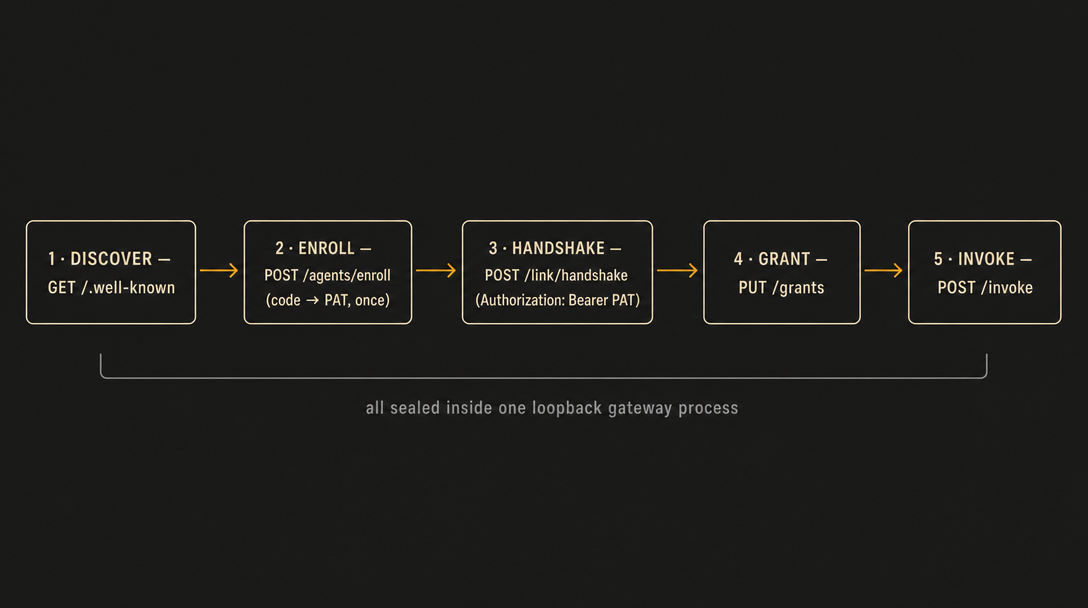
The launcher is your complete and only interface. Drive every interaction through plexus-<agentId> …. Never hand-roll HTTP against the gateway, never guess an auth header, never try to mint or read a token. The command already encapsulates the sanctioned enroll → handshake → grant → invoke flow — if something can't be done through the command, it isn't authorized that way, and the gateway will reject the attempt.
The three verbs
plexus-<agentId> enroll — once
plexus-<agentId> enroll <one-time-code>The first-run bootstrap — the one-command install normally runs it for you. It redeems the one-time enrollment code for your durable per-agent PAT (plx_agent_…), and the launcher stores that credential itself, under its own home, 0600 — the PAT never enters your context. (If you manage the credential in your own idiom, a PLEXUS_PAT environment variable overrides the stored file.) The code is single-use and dies on redemption; the stored credential is your identity from then on. You run this exactly once — every later session starts authenticated from the launcher's stored credential.
plexus-<agentId> list — to discover
plexus-<agentId> listThe discovery verb, and how you orient before you act. It enumerates your capabilities — the subset the owner authorized for you — in three groups:
- callable-now — capabilities you hold a standing grant for. Invoke them directly.
- needs-approval — capabilities in your authorized subset without a live standing grant: chiefly side-effecting (
write/execute) capabilities the owner did not opt into standing (these pend for the owner on every call), plus grants that have expired or been revoked. Anything outside your authorized subset is denied outright, never pended. - skills — usage guidance you read as context;
plexus-<agentId> <id>prints the guide instead of making a wire call.
Use list instead of guessing capability ids. It is a projection over your per-agent manifest — the capabilities the owner authorized for you, delivered after the handshake — so it shows exactly and only your authorized subset.
plexus-<agentId> <capabilityId> — to invoke
plexus-<agentId> workspace.read path=notes/plexus.mdInvoke a capability by its id, passing input as key=value pairs (or --input '<json>' for complex shapes). Under the hood the launcher performs the whole PAT → scoped-token → invoke chain and hands you back the result; the plumbing never enters your context. If a capability needs approval, the invoke surfaces a structured pending state pointing at the owner's console — you cannot mint your own token, and no error will ever suggest that you can.
Why this shape
The launcher exists so you never have to reason about the wire. Its auth/invoke core is rendered from a deterministic per-agent-type template and byte-verified against the Floor at build time — it is not LLM-authored and cannot ship an over-reaching auth path. Everything you can legitimately do is reachable through the three verbs above; everything else the gateway refuses by design.
The skill that ships with the plugin is a projection over the Floor, not a replacement for it — so even if the skill is stale, the gateway's live authorization is the only thing that decides what actually runs. That is why you can trust list and act on it directly.
Going deeper
- Connect an agent — the owner-side flow that produced your install command.
- The compile model — why the resource onboards you, in your own idiom, instead of making you learn a protocol.